
UTM best practices are standardized rules for creating, naming, and managing UTM parameters to ensure clean, consistent campaign tracking data in Google Analytics 4. Most marketing teams get this wrong. According to Improvado, 30% of companies skip UTM markup in over 30% of their campaigns, and another 20% use parameters so inconsistently that their attribution data is unreliable.
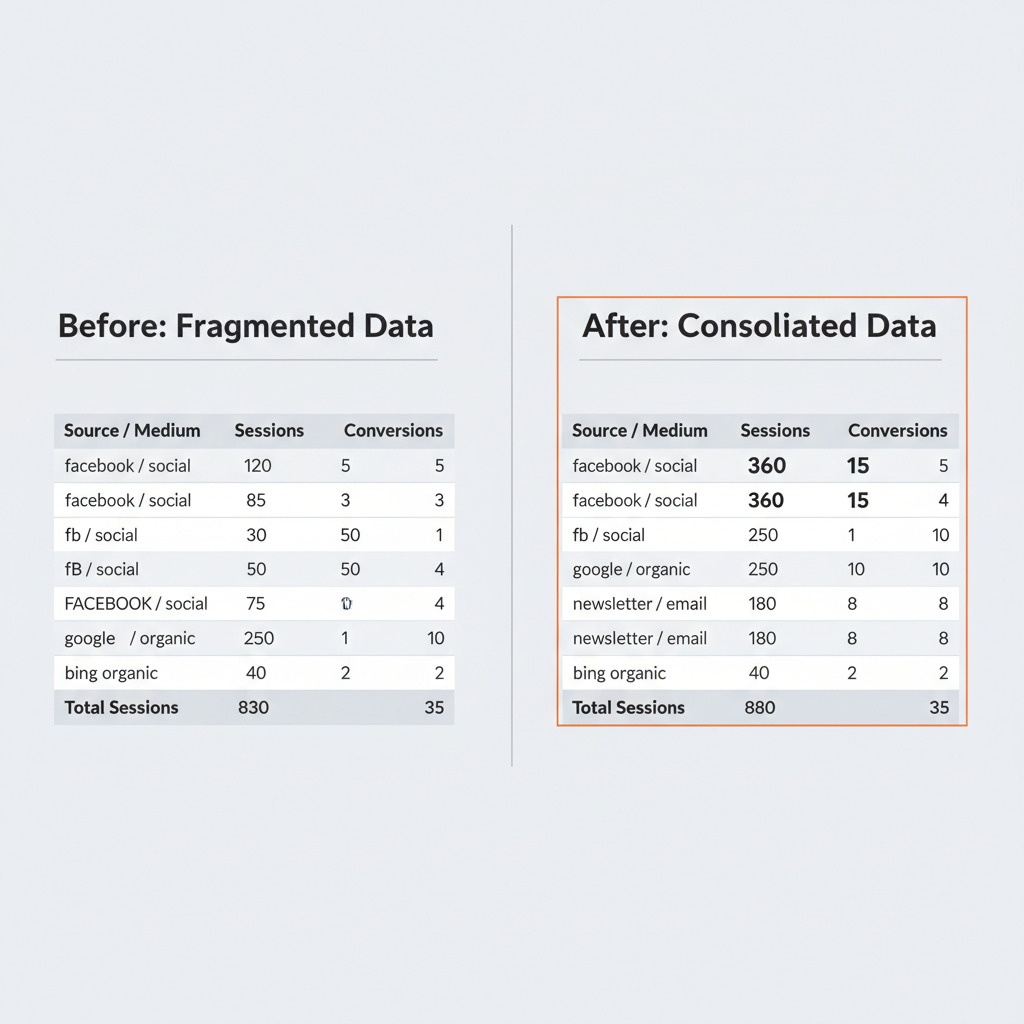
The result? Fragmented reports where “facebook,” “Facebook,” and “fb” show up as three separate traffic sources. Budget decisions based on bad data. Campaign performance you can’t trust.
This guide covers 12 battle-tested UTM best practices, channel-specific naming templates, and a monthly audit checklist to fix your campaign tracking. Companies that implement standardized UTM naming conventions see a 29% improvement in campaign attribution accuracy, according to CXL Institute. These aren’t complicated rules, but they require consistency.
Why Do UTM Best Practices Matter in 2026?
UTM best practices matter because they are the foundation of accurate campaign attribution in a privacy-first marketing landscape. Without consistent UTM implementation, your GA4 reports become unreliable, and every budget decision based on that data carries risk.
The data quality problem is widespread. According to Improvado, 30% of companies don’t use UTM markup in over 30% of campaigns, and 42% of marketers still report attribution manually using spreadsheets (Marketing LTB, 2025). That’s a massive gap between available UTM tracking best practices and actual implementation.
Privacy changes made UTMs more valuable, not less. With 78% of existing attribution setups impacted by cookie deprecation, UTM parameters represent one of the few tracking methods that work without relying on third-party cookies. UTMs are first-party, privacy-compliant, and platform-independent.
First-party data is your competitive advantage. Organizations leveraging first-party data strategies see 2.9x better customer retention and 1.5x higher marketing ROI (Google/BCG). UTM parameters best practices are the starting point for that first-party data collection, feeding clean campaign signals directly into GA4.
GA4 is now the universal standard. Google Analytics 4 runs on 14.2 million websites with an 81.4% market share in web analytics (W3Techs, 2026). Every UTM parameter you create flows into GA4’s attribution model. Bad UTMs mean bad GA4 data. Period.
73% of high-performing marketing teams use advanced tracking systems including UTM management, according to HubSpot (2025). If your team still copies UTM tagging best practices from scattered spreadsheets instead of using proper tools, you’re in the bottom 27%.

What Are the 5 UTM Parameters?
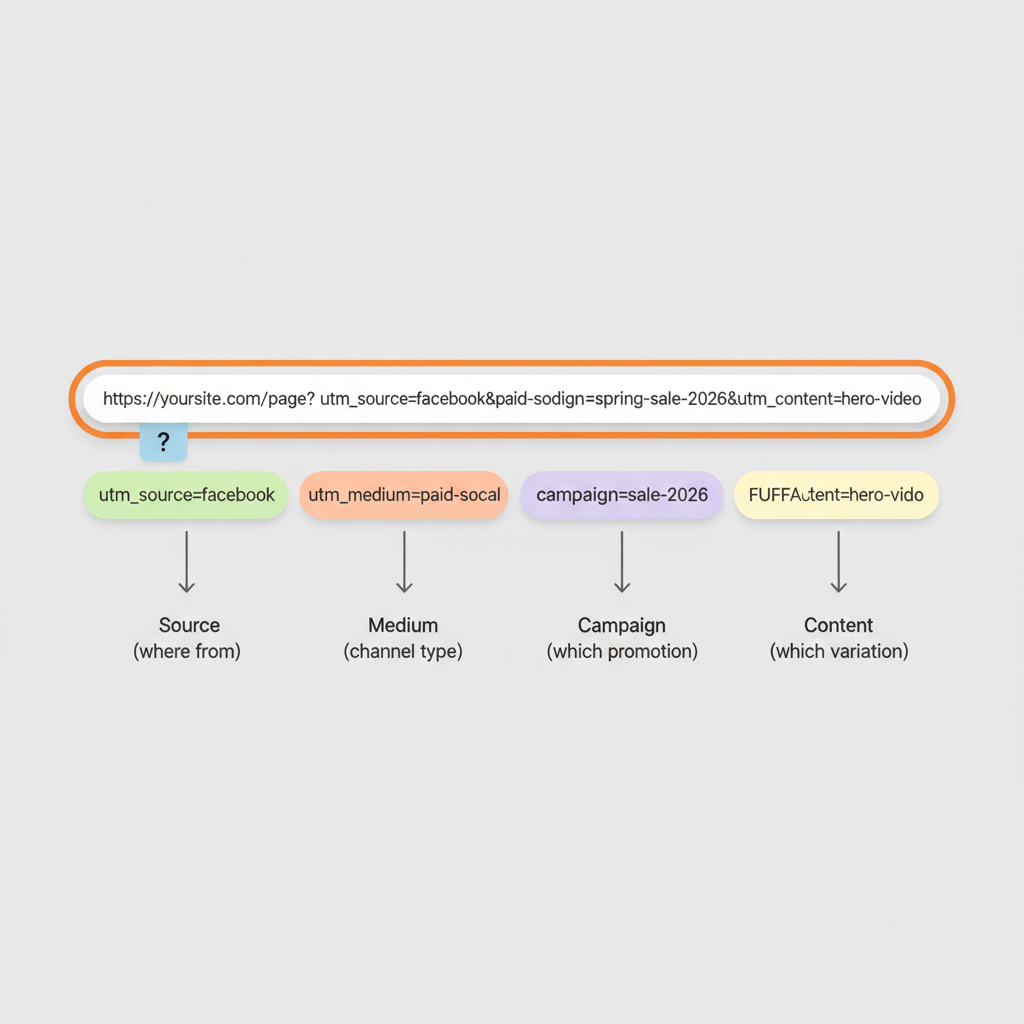
The five UTM parameters are utm_source, utm_medium, utm_campaign, utm_content, and utm_term. These are standardized URL tags that pass campaign attribution data to analytics platforms when someone clicks the tagged link.
A UTM-tagged URL looks like this:
https://yoursite.com/landing-page?utm_source=facebook&utm_medium=paid-social&utm_campaign=spring-sale-2026&utm_content=hero-videoEverything after the ? contains UTM parameters that tell GA4 exactly where this visitor came from, how they got there, and which campaign brought them. You can build these URLs using Google’s Campaign URL Builder or a dedicated UTM management tool.
The 5 UTM parameters at a glance:
| Parameter | Required? | Purpose | Example Values |
|---|---|---|---|
| utm_source | Yes | Identifies the traffic source (platform or property) | google, facebook, newsletter, linkedin |
| utm_medium | Yes | Identifies the marketing channel type | cpc, email, social, paid-social, display |
| utm_campaign | Yes | Identifies the specific campaign or promotion | spring-sale-2026, product-launch-q1 |
| utm_content | No | Differentiates link variations within a campaign | hero-banner, sidebar-cta, text-link-v2 |
| utm_term | No | Identifies paid search keywords | marketing-software, crm-tool |
Required Parameters: Source, Medium, and Campaign
utm_source identifies the specific platform or property sending traffic. Examples: “google,” “facebook,” “newsletter,” “linkedin.” This parameter answers “where did the visitor come from?”
utm_medium identifies the marketing channel type. Examples: “cpc” for paid search, “email” for email campaigns, “social” for organic social posts, “paid-social” for social ads. This parameter answers “what type of channel brought them?”
utm_campaign identifies the specific marketing campaign. Examples: “spring-sale-2026,” “product-launch-q1,” “weekly-digest-2026-03.” This parameter answers “which campaign brought them?”
Every link you track needs all three required parameters. Without any one of them, your GA4 data has gaps.
Optional Parameters: Content and Term
utm_content differentiates multiple links within the same campaign. This parameter is essential for A/B testing, tracking which specific creative or placement drives clicks. Example: “hero-banner” vs. “sidebar-cta” vs. “footer-link.”
utm_term identifies the paid search keyword that triggered an ad click. Primarily used in Google Ads and Microsoft Ads for keyword-level attribution. Example: “marketing-software” or “crm-tool.” If you use Google Ads auto-tagging, this parameter gets populated automatically.
What Are the 12 UTM Best Practices for Accurate Campaign Tracking?
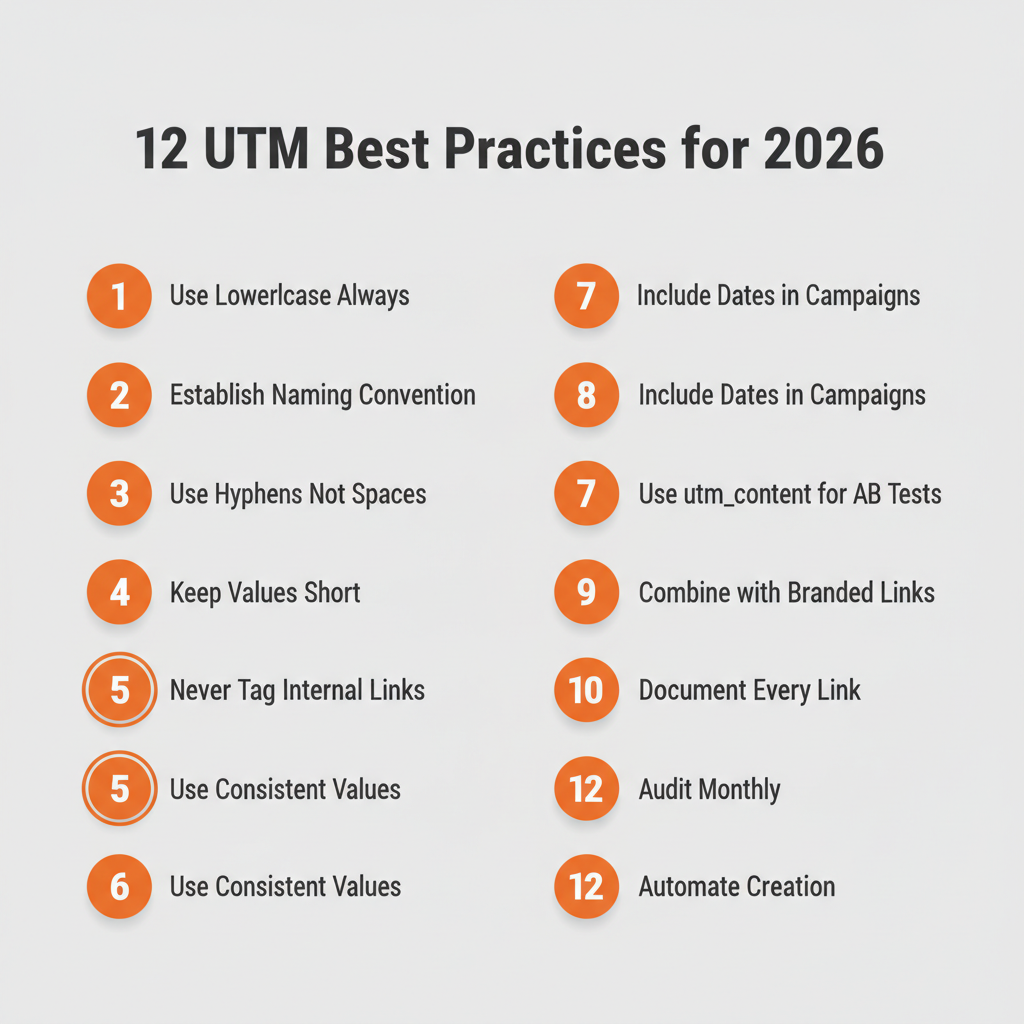
The 12 UTM best practices are: (1) use lowercase for all values, (2) establish a naming convention first, (3) use hyphens or underscores as separators, (4) keep values short but descriptive, (5) never tag internal links, (6) use consistent values across campaigns, (7) include dates in campaign names, (8) use utm_content for A/B testing, (9) combine UTMs with branded short links, (10) document every UTM link centrally, (11) audit implementation monthly, and (12) automate UTM creation where possible.
1. Use Lowercase for All UTM Parameter Values
Always use lowercase for every UTM parameter value. UTM parameters are case-sensitive in Google Analytics 4, meaning “Facebook,” “facebook,” and “FACEBOOK” register as three separate traffic sources in your reports. This single mistake is the most common cause of fragmented campaign data.
Wrong:
- utm_source=Facebook
- utm_source=FACEBOOK
- utm_source=FaceBook
Right:
- utm_source=facebook
This applies to every UTM parameter, not just source. Campaign names, medium values, and content identifiers all must be lowercase. No exceptions, even for brand names.
2. Establish a Naming Convention Before Launching Campaigns
Create a documented naming convention before creating any UTM code. A naming convention is a written set of rules that defines exactly how UTM parameter values are formatted, structured, and applied across all campaigns. Organizations that implement standardized UTM naming conventions see a 29% improvement in campaign attribution accuracy (CXL Institute, 2023). This is one of the most impactful UTM campaign best practices you can adopt.
Your naming convention should include:
- Approved values for utm_source (the exact platforms you track)
- Approved values for utm_medium (standard channel types)
- Campaign name format (how to structure utm_campaign values)
- Date format (YYYY-MM, YYYY-Q#)
- Separator choice (hyphens or underscores)
- Examples for every channel your team uses
Write it down. Share it with everyone who creates links. Update it when new channels or campaign types are added.
3. Use Hyphens or Underscores as Separators, Never Spaces
Separate words in UTM values with hyphens or underscores, never spaces. Spaces become “%20” in URLs, which causes encoding issues, breaks tracking in some platforms, and makes links look unprofessional.
Wrong: utm_campaign=spring sale 2026 (becomes spring%20sale%202026 in the URL)
Right: utm_campaign=spring-sale-2026 or utm_campaign=spring_sale_2026
Pick one separator and enforce it across your entire organization. Hyphens are more readable in URLs. Underscores match some GA4 default channel grouping formats. Either works, but mixing them creates inconsistency.
4. Keep Parameter Values Short but Descriptive
Limit each UTM parameter value to under 50 characters while keeping it descriptive enough to understand without a lookup table. Overly long values increase the chance of typos and make reports harder to scan.
Too long: utm_campaign=our-amazing-spring-2026-clearance-sale-for-new-customers-east-coast-region
Too short: utm_campaign=q1p1 (what does this mean three months later?)
Right: utm_campaign=spring-clearance-2026
The goal is clarity. If someone sees this value in a GA4 report six months from now, they should immediately understand what campaign it refers to.
5. Never Tag Internal Links with UTM Parameters
Never add UTM parameters to links between pages on your own website. This is the most damaging UTM mistake because it corrupts your attribution data silently.
When a visitor clicks an internal UTM-tagged link, GA4 starts a new session and attributes it to whatever source you put in the UTM. The original traffic source (the Google search, email click, or social post that actually brought them to your site) gets overridden and lost.
Example of what goes wrong: A visitor arrives from a Facebook ad. They click a UTM-tagged internal link to your pricing page. GA4 now shows the conversion came from “internal-promo” instead of “facebook/paid-social.” Your Facebook Ads ROI data is now wrong.
Use GA4 event tracking for monitoring internal link clicks instead. UTM parameters are exclusively for external links pointing to your site.
6. Use Consistent Values Across All Campaigns
Create an approved list of utm_source, utm_medium, and utm_campaign values and share it with every person who creates campaign links. Inconsistency is what turns clean data into chaos.
Here’s how one email channel becomes five separate entries in GA4:
- utm_medium=email
- utm_medium=Email
- utm_medium=e-mail
- utm_medium=newsletter
- utm_medium=mail
That’s five data fragments for a single channel. Each one looks small in reports, masking the true performance of your email marketing.
Standard utm_medium values your team should adopt:
| utm_medium Value | Use For |
|---|---|
| cpc | Paid search ads (Google Ads, Bing Ads) |
| Email marketing campaigns and newsletters | |
| social | Organic social media posts |
| paid-social | Paid social media advertising |
| display | Display and banner advertising |
| referral | Third-party website links and partnerships |
| affiliate | Affiliate marketing program links |
| video | Video advertising (YouTube, pre-roll) |
Print this list. Pin it in your team Slack channel. Put it in your campaign creation workflow. Make it unavoidable.
7. Include Dates in Campaign Names
Add date identifiers to utm_campaign values using YYYY-MM or YYYY-Q# format. Dates enable time-based performance analysis and make it easy to compare recurring campaigns across periods.
Without dates: utm_campaign=monthly-newsletter (which month? which year?)
With dates: utm_campaign=monthly-newsletter-2026-03 (March 2026, clearly identified)
Use numeric date formats, not month names. “march” vs. “mar” vs. “03” creates the same inconsistency problem you’re trying to solve. YYYY-MM sorts chronologically and works across all tools.
For quarterly campaigns, use Q# format: utm_campaign=product-launch-2026-q1
8. Use utm_content for A/B Testing Creative Variations
Use the utm_content parameter to track which creative variations, link placements, or messaging versions drive the most clicks and conversions. This parameter is optional but delivers some of the most actionable data in your UTM toolkit.
Email marketing example:
- utm_content=header-cta (button at top of email)
- utm_content=product-image (clickable product photo mid-email)
- utm_content=footer-text-link (text link in footer)
After sending, you discover the product image gets 3x more clicks than the header button. That insight changes how you design every future email.
Social media example:
- utm_content=carousel-v1
- utm_content=single-image-v1
- utm_content=video-15s
Now you know which post format drives the most engaged traffic, not just likes, but actual clicks to your site.
9. Combine UTMs with Branded Short Links
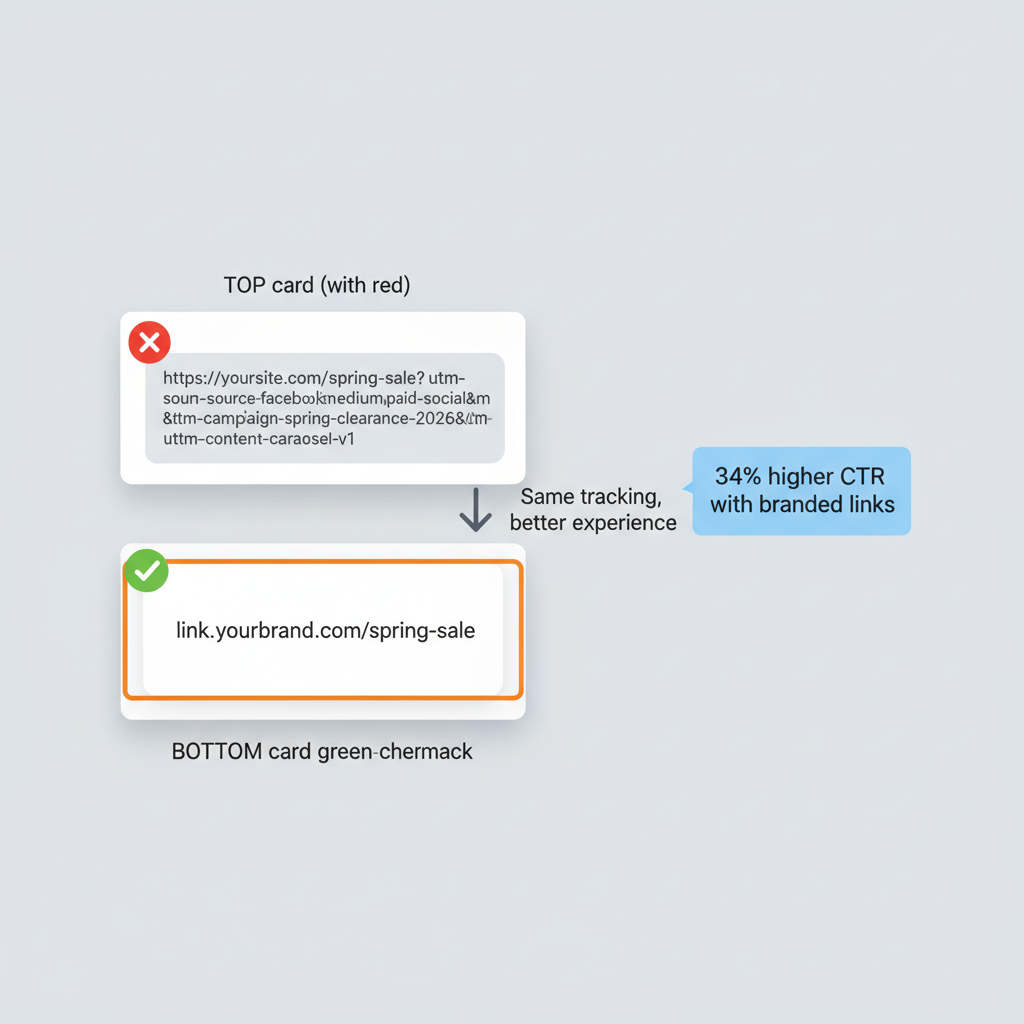
Pair UTM parameters with branded short links to increase click-through rates by up to 34%. Branded short links use your own domain (like link.yourbrand.com/spring-sale) instead of generic shorteners (bit.ly/3xF9kL), and according to Bitly research, custom domain links get 2.3x more clicks on average.
The problem with long UTM URLs:
https://yoursite.com/spring-sale?utm_source=facebook&utm_medium=paid-social&utm_campaign=spring-clearance-2026&utm_content=carousel-v1
That URL looks suspicious in social posts. It’s too long for character-limited platforms. And it exposes your campaign structure to competitors.
The branded short link solution:
link.yourbrand.com/spring-sale
Clean, professional, trustworthy. The UTM parameters are preserved behind the redirect, so GA4 still gets every parameter. Your audience sees a branded link they recognize.
Tools like linkutm let you build UTM parameters and create branded short links in one step, with naming convention enforcement built in. No copying between tools. No missed parameters.
10. Document Every UTM Link in a Centralized System
Store every UTM link you create in a single, searchable location. Without centralized documentation, links get buried in email threads, scattered across spreadsheets, and lost in Slack messages. Three months later, nobody can find the link or remember what naming convention they used.
What to document for each link:
- Destination URL
- Full UTM-tagged URL
- Campaign name and purpose
- Date created
- Who created it
- Channel and platform
- Short link (if applicable)
Spreadsheets work for small teams creating a handful of links per month. But they break at scale. Once your team creates more than 50 campaign links monthly, a dedicated link management tool with search, filtering, and team access becomes necessary.
The key benefit of centralized documentation isn’t just finding old links. It’s preventing duplication. When a teammate can search your link library before creating a new one, you avoid creating five slightly different links for the same campaign. Read our guide on how to organize campaign links for a deeper look at link organization systems.
11. Audit Your UTM Implementation Monthly
Schedule monthly reviews of your GA4 source/medium reports to catch UTM inconsistencies before they compound. Even with naming conventions and templates, mistakes slip through. A monthly audit catches them early.
Monthly UTM audit checklist:
- [ ] Check GA4 Traffic Acquisition for duplicate or misspelled source values
- [ ] Verify no internal pages are tagged with UTM parameters
- [ ] Confirm all active campaigns have UTM tracking in place
- [ ] Look for utm_medium values outside your approved list
- [ ] Test 3-5 active campaign links for proper parameter passing
- [ ] Review campaign naming for date format consistency
- [ ] Update your naming convention document if new channels were added
Navigate to Reports > Acquisition > Traffic Acquisition in GA4 and scan the session source/medium column. If you see “Facebook” and “facebook” as separate rows, you’ve found an inconsistency to fix going forward.
You can’t retroactively fix historical UTM data in GA4. But every inconsistency you catch and prevent saves months of fragmented data.
12. Automate UTM Creation Where Possible
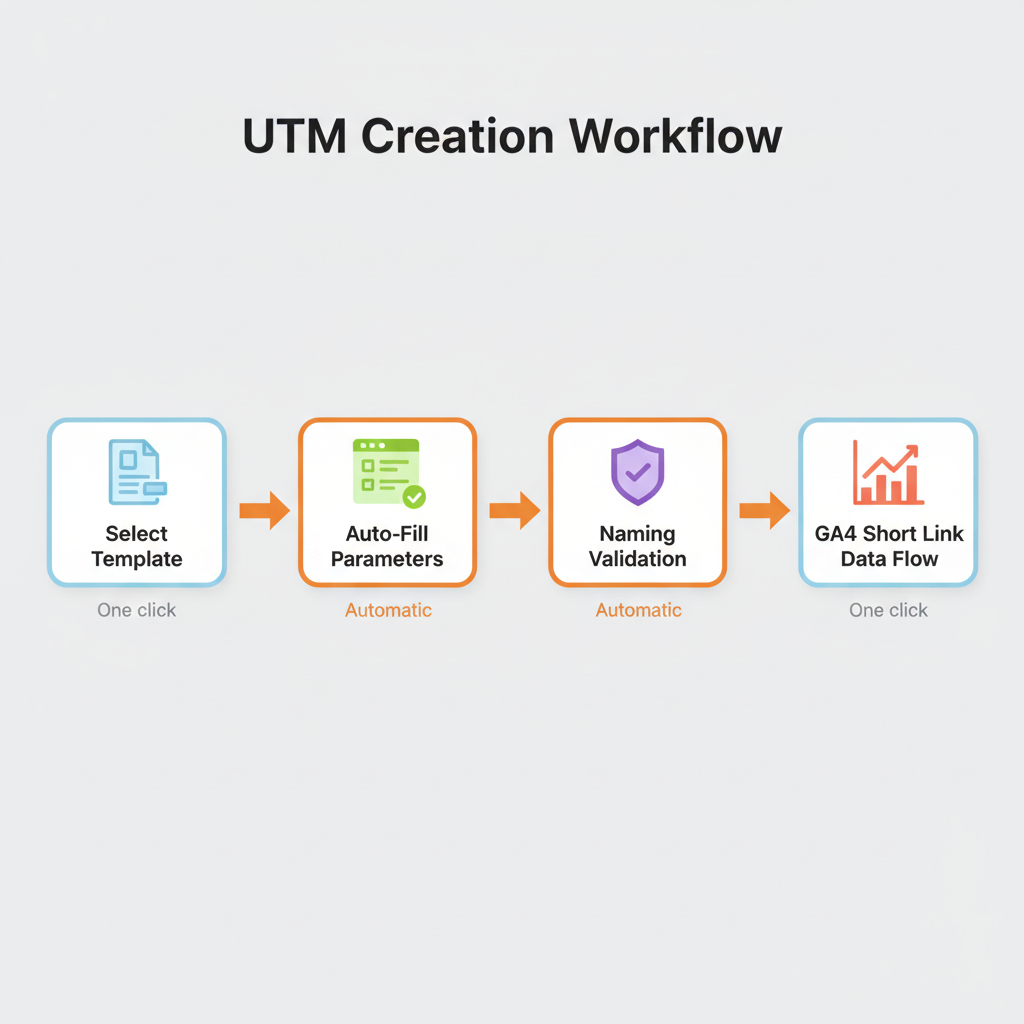
Use templates and platform macros to eliminate manual UTM creation errors. Automation is one of the most overlooked UTM tracking best practices. Every manual step in the link creation process is a chance for typos, inconsistent naming, and missed parameters.
Template automation: Save reusable UTM templates for recurring campaigns. A “monthly newsletter” template pre-fills utm_source=newsletter, utm_medium=email, and the campaign name format, so your team only fills in the variable parts.
Platform macros: Major ad platforms offer dynamic UTM parameters that auto-populate:
- Google Ads:
{campaignid},{adgroupid},{keyword} - Meta (Facebook/Instagram):
{ad.name},{campaign.name},{adset.name} - Microsoft Ads:
{AdGroupId},{Campaign},{keyword}
These macros pull values directly from your ad platform into UTM parameters, eliminating manual entry entirely for paid campaigns.
UTM builder tools like linkutm enforce naming conventions automatically. If someone tries to use “Facebook” instead of “facebook,” the tool catches it before the link is created. That’s prevention, not cleanup.
What Are the Best UTM Naming Convention Models?
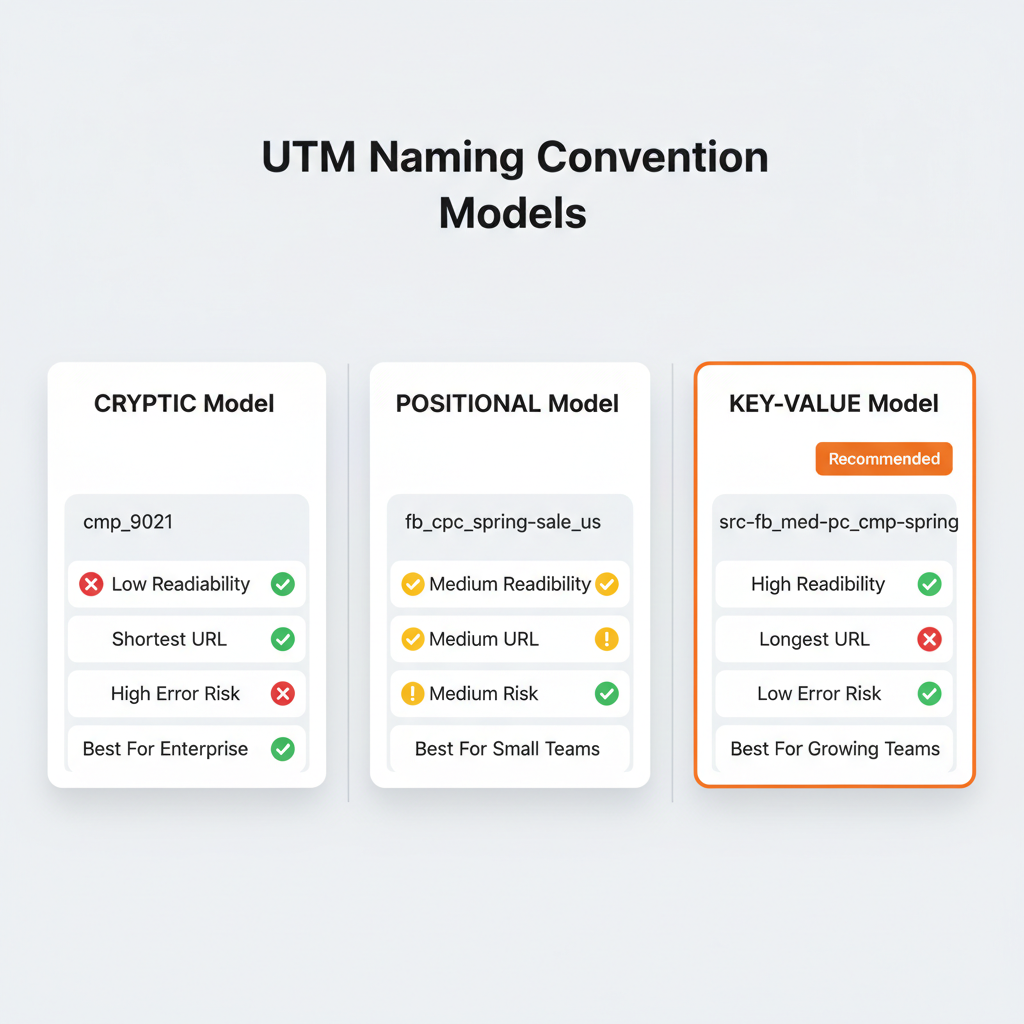
The three main UTM naming convention models are Cryptic, Positional, and Key-Value. Each suits different team sizes and organizational needs. Choosing the right model before building your first link prevents the naming chaos that fragments GA4 data.
| Feature | Cryptic | Positional | Key-Value |
|---|---|---|---|
| Example | cmp_9021 | fb_cpc_spring-sale_us | src-fb_med-cpc_cmp-spring |
| Readability | Low (needs lookup table) | Medium (order-dependent) | High (self-documenting) |
| URL Length | Shortest | Medium | Longest |
| Error Risk | High (typos in codes) | Medium (position errors) | Low (explicit keys) |
| Scalability | Good | Moderate | Excellent |
| Best For | Enterprise/security-focused | Small to mid-size teams | Growing, multi-team orgs |
| Requires Documentation | Mandatory | Recommended | Optional |
Key-Value is the best choice for most marketing teams because each value is self-documenting. A teammate who sees src-fb_med-cpc_cmp-spring-sale understands it immediately without checking a reference guide. The trade-off is slightly longer URLs, but branded short links solve that.
For smaller teams with fewer than five people creating links, the Positional model (facebook_cpc_spring-sale) works well. It’s shorter and simpler, but everyone needs to memorize the position order.
Avoid the Cryptic model unless your organization has security requirements that prevent campaign names from appearing in URLs. The lookup table dependency makes it fragile and error-prone.
UTM Naming Convention Templates by Channel
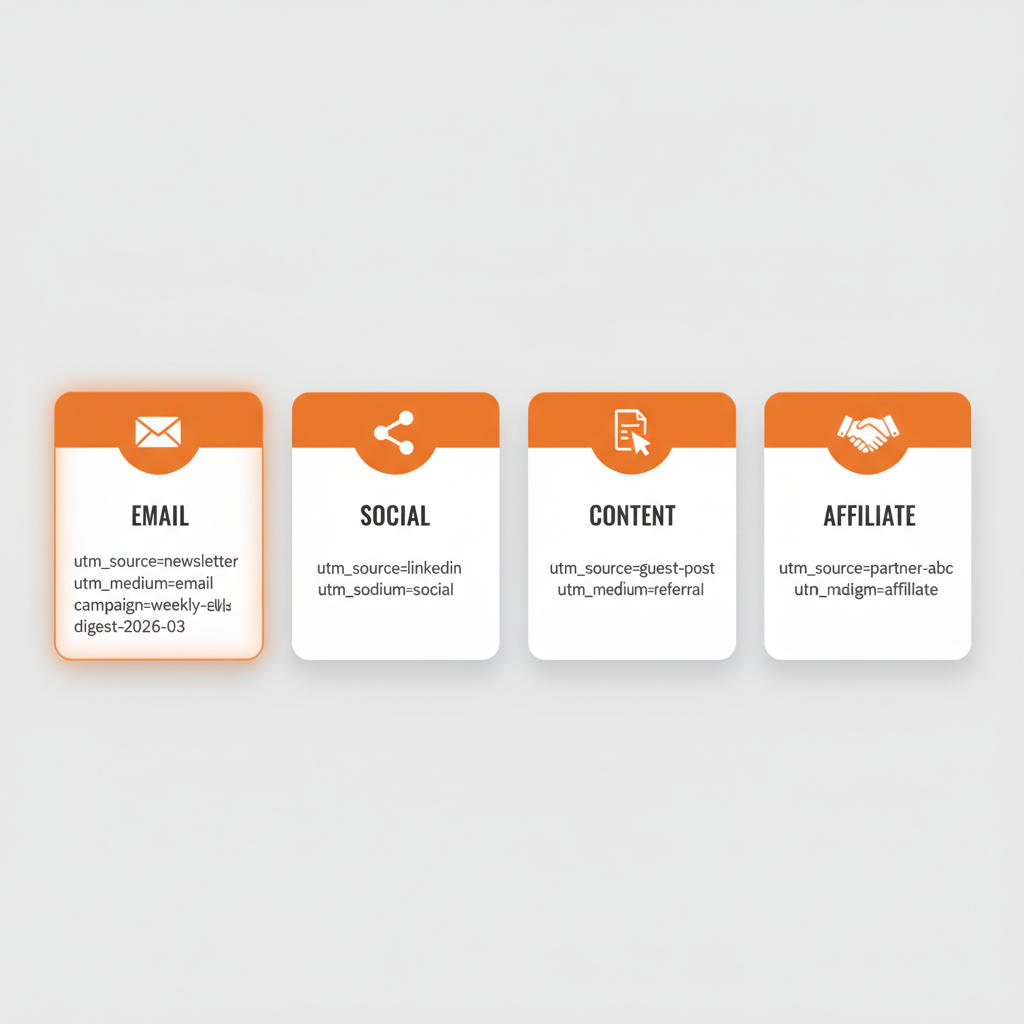
No single UTM structure works perfectly across all channels. Following UTM best practices means adapting your parameter conventions to each channel. Email campaigns need different parameters than paid search ads or influencer partnerships. These channel-specific templates give you copy-paste conventions for the five most common marketing channels.
Email Marketing UTM Template
| Parameter | Convention | Example |
|---|---|---|
| utm_source | newsletter, email-blast, automation, transactional | newsletter |
| utm_medium | ||
| utm_campaign | [type]-[topic]-[YYYY-MM] | weekly-digest-2026-03 |
| utm_content | [cta-position] or [variant] | header-cta, footer-link |
| utm_term | (leave empty for email) | – |
Full URL example:
yoursite.com/pricing?utm_source=newsletter&utm_medium=email&utm_campaign=weekly-digest-2026-03&utm_content=header-cta
Tag every clickable element in your emails, including CTAs, product images, footer links, and social icons. Untagged links won’t appear in your campaign reports. Learn more about tracking email campaigns with UTM parameters.
Social Media UTM Template
| Parameter | Organic Convention | Paid Convention |
|---|---|---|
| utm_source | facebook, instagram, linkedin, twitter, tiktok | facebook, instagram, linkedin |
| utm_medium | social | paid-social |
| utm_campaign | [platform]-[topic]-[YYYY-MM] | [platform]-[objective]-[YYYY-MM] |
| utm_content | [post-format]-[variant] | [ad-format]-[variant] |
| utm_term | (leave empty) | [audience-segment] |
Critical distinction: Use “social” for organic posts and “paid-social” for paid advertising. Combining them into one medium makes it impossible to measure paid vs. organic performance separately in GA4.
Organic example:
utm_source=linkedin&utm_medium=social&utm_campaign=linkedin-thought-leadership-2026-02&utm_content=carousel-v1
Paid example:
utm_source=facebook&utm_medium=paid-social&utm_campaign=facebook-retargeting-2026-02&utm_content=video-15s&utm_term=website-visitors
Paid Search UTM Template
| Parameter | Convention | Example |
|---|---|---|
| utm_source | google, bing, yahoo | |
| utm_medium | cpc | cpc |
| utm_campaign | [product]-[campaign-type]-[geo] | crm-brand-us |
| utm_content | [ad-variant] | ad-v2-extended |
| utm_term | {keyword} (dynamic macro) | marketing-software |
Auto-tagging vs. manual UTMs: Google Ads auto-tagging (gclid) handles most attribution automatically. Use manual UTM tagging best practices when you need campaign data in third-party analytics tools, or when comparing Google Ads performance alongside other channels in a unified view.
If you use both auto-tagging and manual UTMs, enable “Allow manual tagging to override auto-tagging” in your GA4 property settings.
Content Marketing and Referral UTM Template
| Parameter | Convention | Example |
|---|---|---|
| utm_source | [partner-name] or [platform] | industry-blog, podcast-name |
| utm_medium | referral, content-syndication | referral |
| utm_campaign | [content-type]-[topic]-[YYYY-MM] | guest-post-utm-tracking-2026-02 |
| utm_content | [placement] | author-bio, in-content-link |
Use for: Guest posts, podcast show notes, webinar registration links, content syndication, and co-marketing partnerships.
Affiliate and Influencer UTM Template
| Parameter | Convention | Example |
|---|---|---|
| utm_source | [affiliate-name] or [influencer-handle] | @marketingpro, partner-abc |
| utm_medium | affiliate or influencer | affiliate |
| utm_campaign | [program-name]-[YYYY-Q#] | summer-affiliate-2026-q2 |
| utm_content | [content-type]-[placement] | youtube-description, ig-story |
Tracking individual affiliate and influencer performance with unique utm_source values per partner gives you accurate attribution data for commission calculations and partnership decisions.
What Are the Most Common UTM Tracking Mistakes?
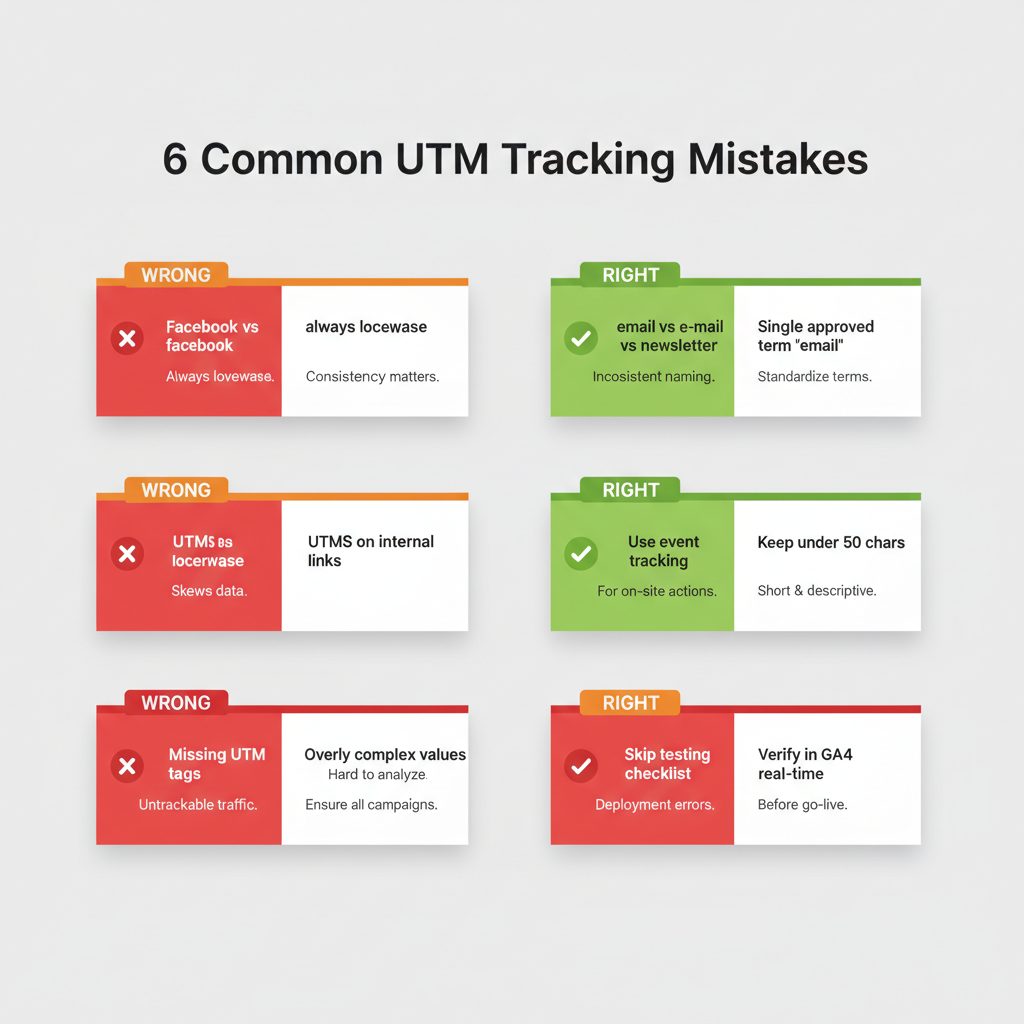
The six most common UTM tracking mistakes are case inconsistency, tagging internal links, inconsistent terminology, missing UTM tags on campaigns, overly complex parameter values, and not testing before launch. Each one silently corrupts your attribution data.
| Mistake | Consequence | Fix |
|---|---|---|
| Mixed case (Facebook vs facebook) | Data splits into separate sources in GA4 | Enforce lowercase for all values |
| UTMs on internal links | Overrides original traffic source | Use GA4 event tracking instead |
| Inconsistent terms (email vs e-mail) | Fragments reporting data into silos | Maintain and share an approved values list |
| Missing UTM tags on campaigns | Creates attribution blind spots | Add UTMs to your campaign launch checklist |
| Overly complex parameter values | More typos, harder to debug | Keep values under 50 characters |
| Not testing before launch | Lost, unrecoverable tracking data | Verify in GA4 real-time before publishing |
Case inconsistency is the number one offender. It’s invisible until you open GA4 and notice “facebook” and “Facebook” eating into each other’s numbers. GA4 treats these as entirely separate sources. They don’t merge. They don’t combine. Every report, every dashboard, every attribution model shows them apart.
Tagging internal links is the most damaging mistake. One UTM-tagged internal link can overwrite an entire session’s attribution. A visitor who arrived through a $50 Google Ads click suddenly shows as “internal-promo” in your conversion report. Your CPA calculations are now wrong.
Missing UTM tags create invisible gaps. According to Improvado, 30% of companies skip UTM markup in over 30% of their campaigns. Those campaigns still drive traffic. But that traffic shows up as “direct” or “referral” in GA4, hiding the true channel performance.
Not testing before launch is unrecoverable. If your UTM link has a typo or broken parameter, the data is wrong from the first click. You can’t fix historical GA4 data. Always click your tagged link and check GA4 real-time reports before going live.
How Do I Check UTM Parameters in Google Analytics 4?
Check UTM parameters in GA4 by navigating to the Traffic Acquisition report, which displays session data organized by source, medium, and campaign. You can verify new UTM links in real-time and build custom reports for deeper analysis.
How to Test UTMs in Real-Time
- Open your GA4 property and navigate to Reports > Realtime
- Click your UTM-tagged link from an incognito browser window
- Watch for your visit to appear in the real-time report
- Verify the source, medium, and campaign values match what you intended
- Check for typos, encoding issues, or missing parameters
If your UTM data doesn’t appear within 30 seconds, check whether the URL encoded correctly (no broken %20 spaces) and that all parameters use the utm_ prefix.
Where to Find UTM Data in Traffic Acquisition
Navigate to Reports > Acquisition > Traffic Acquisition to see all traffic organized by session source/medium. This report shows how visitors arrived at your site, broken down by the UTM parameters you tagged.
Add Session campaign as a secondary dimension to see campaign-level performance. Filter by specific utm_source or utm_medium values to isolate channel performance.
How to Build Custom UTM Reports in Explorations
For advanced UTM analysis, use GA4’s Explore > Free Form to build custom reports:
- Create a new Free Form exploration
- Add dimensions: Session source, Session medium, Session campaign, Session content
- Add metrics: Sessions, Engaged sessions, Conversions, Revenue
- Apply filters to drill into specific channels or campaigns
- Save and share the exploration with your team
Custom explorations let you compare ad channel performance across every UTM dimension, giving you the granular view that standard reports don’t provide.
What Are Advanced UTM Strategies for 2026?
Advanced UTM strategies for 2026 go beyond basic utm best practices to include team governance, revenue attribution, privacy-first tracking, and AI-assisted management. These strategies separate teams that track campaigns from teams that optimize them.
UTM Governance for Teams
UTM governance is the organizational process of assigning roles, enforcing naming conventions, and auditing UTM implementation to maintain data quality across teams. Without governance, naming conventions decay within weeks as new team members create links without reading the docs.
Assign clear roles:
- Link creators: Team members who build campaign links (follow the naming convention)
- Template managers: One or two people who maintain UTM templates and approved values
- Auditors: Monthly reviewers who check GA4 for inconsistencies
- Approvers: Senior marketers who sign off on new campaign types or naming changes
Onboard new team members by sharing your naming convention document, walking through 3-5 example links, and having them create their first few links under supervision. A 15-minute onboarding session prevents months of data fragmentation.
Connecting UTMs to Revenue
Pass UTM parameters through your website forms into your CRM to create closed-loop attribution, connecting every marketing campaign directly to revenue, not just clicks.
Here’s how it works:
- A visitor clicks your UTM-tagged link and lands on your site
- Hidden form fields capture the utm_source, utm_medium, and utm_campaign values
- When the visitor fills out a form, UTM data is stored alongside their contact information
- Your CRM (HubSpot, Salesforce, Pipedrive) shows which campaign generated each lead
- When that lead converts to a customer, revenue attribution flows back to the original UTM
This transforms UTM tracking from “which channels drive traffic” to “which channels drive revenue.” That’s the difference between reporting and decision-making. You can learn to calculate your digital marketing ROI with this attribution data.
Privacy-First UTM Tracking
UTM parameters are inherently privacy-compliant because they describe the campaign, not the user. Unlike third-party cookies that track individual browsing behavior, UTMs simply label the traffic source. This makes them compatible with GDPR, CCPA, and every major privacy regulation.
With 72% of global marketers rebuilding strategies around privacy-first data models, UTMs are becoming more important, not less. They represent one of the few tracking methods that works the same regardless of browser privacy settings, ad blockers, or cookie consent.
Server-side tracking combined with UTMs improves data accuracy by 13-27% compared to client-side tracking alone. If your marketing budget justifies the technical investment, server-side UTM processing captures data that client-side tracking misses due to ad blockers and browser restrictions.
AI-Assisted UTM Management
AI tools are beginning to automate UTM management tasks that previously required manual oversight. Current capabilities include:
- Auto-classification: AI categorizes incoming traffic sources and flags UTM inconsistencies
- Anomaly detection: AI identifies unusual patterns in UTM data (sudden drops, unexpected sources)
- Naming suggestions: AI recommends UTM values based on your team’s historical patterns
- Predictive attribution: AI models predict which campaigns will convert based on early UTM data
These tools are still emerging, but they point to a future where UTM best practices are partially enforced by AI rather than solely by human discipline.
UTM Best Practices Checklist (Quick Reference)
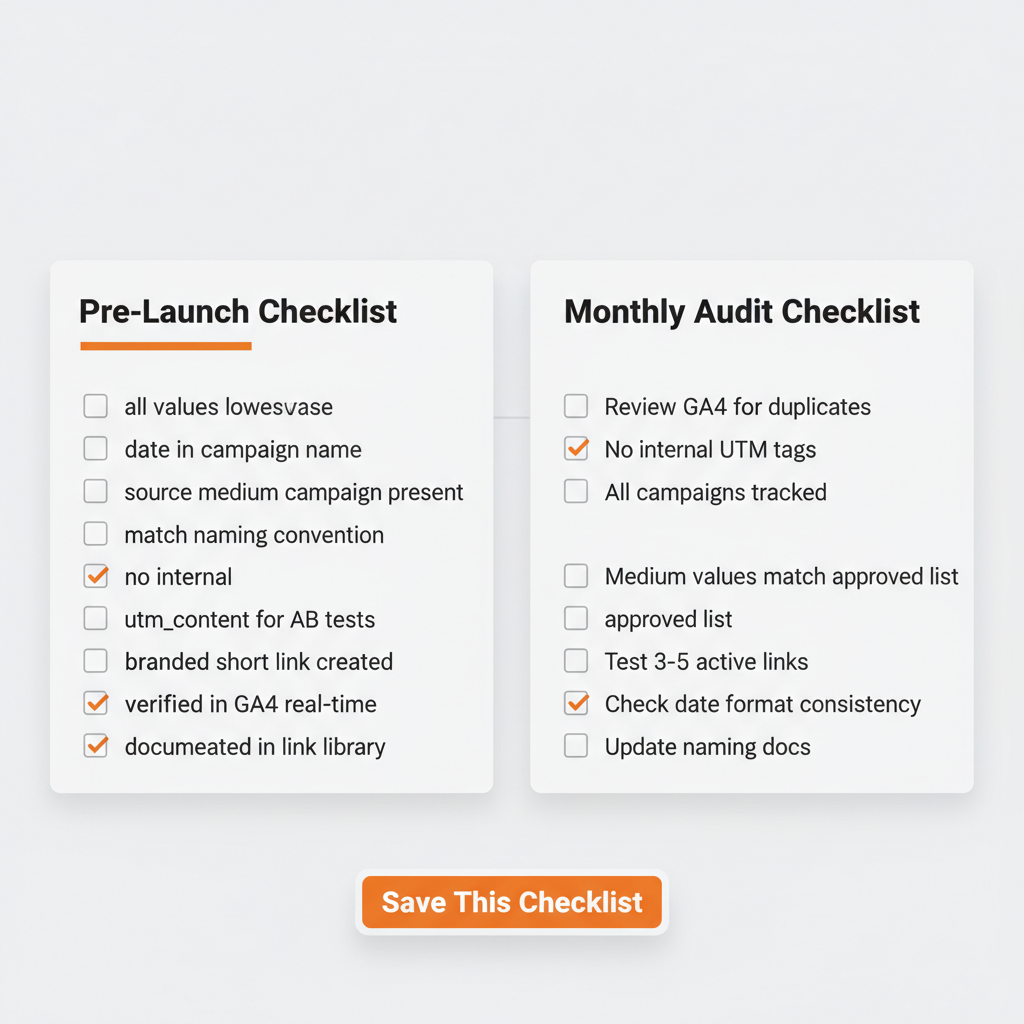
Pre-Launch Campaign Checklist
- All UTM values are lowercase
- Campaign name includes date (YYYY-MM or YYYY-Q#)
- utm_source, utm_medium, and utm_campaign are all present
- Values match your approved naming convention
- No UTMs on internal links
- utm_content is set for A/B test variations
- Link is shortened with a branded domain
- Link has been clicked and verified in GA4 real-time
- Link is documented in your centralized link library
Monthly Audit Checklist
- GA4 Traffic Acquisition reviewed for duplicate or misspelled sources
- No internal pages tagged with UTM parameters
- All active campaigns have UTM tracking
- utm_medium values match the approved list
- 3-5 active campaign links tested for proper parameter passing
- Campaign naming checked for date format consistency
- Naming convention document updated with any new channels
Frequently Asked Questions About UTM Best Practices
What are the most important UTM best practices?
The most important UTM best practices are using lowercase for all values, establishing a naming convention before launching campaigns, never tagging internal links, and documenting every UTM link in a centralized system. Companies that implement standardized UTM naming conventions see a 29% improvement in campaign attribution accuracy, according to CXL Institute.
Are UTM parameters case-sensitive?
Yes, UTM parameters are case-sensitive in Google Analytics 4. “Facebook,” “facebook,” and “FACEBOOK” appear as three separate traffic sources in GA4 reports, splitting your data and making accurate analysis impossible. Always use lowercase for every UTM parameter value to prevent data fragmentation.
Should I use UTMs on internal links?
No. Never add UTM parameters to links between pages on your own website. Internal UTMs override the original traffic source in Google Analytics, create false new sessions, and break the customer journey. Use GA4 event tracking to monitor internal link clicks instead.
Do UTM parameters affect SEO?
No, UTM parameters do not affect SEO rankings. Google ignores URL query parameters when indexing pages. However, use canonical tags on UTM-tagged URLs to prevent potential duplicate content issues, and avoid sharing UTM-tagged URLs as permanent links on your website.
Should UTM values use hyphens or underscores?
Either hyphens or underscores work as UTM value separators. Hyphens (spring-sale-2026) are more readable, while underscores (spring_sale_2026) match some GA4 default channel grouping formats. The critical rule is to pick one separator and use it consistently across all campaigns.
How many UTM parameters should I use per link?
Use at least the three required parameters (utm_source, utm_medium, utm_campaign) on every campaign link. Add utm_content when A/B testing creative variations and utm_term for paid search keyword tracking. Most links need three to four parameters for complete attribution data.
What is the best UTM naming convention?
The Key-Value naming convention model is the best choice for most marketing teams because it is self-documenting, flexible, and scalable. Format example: src-facebook_med-cpc_cmp-spring-sale. For small teams, the simpler Positional model (facebook_cpc_spring-sale) also works well. Read our full UTM parameters guide for detailed naming convention models.
How do I fix inconsistent UTM data in GA4?
You cannot retroactively fix inconsistent UTM data in Google Analytics 4. Historical data keeps the original parameter values permanently. To prevent future inconsistency, create an approved values list, enforce it with UTM builder templates, and schedule monthly audits of your GA4 source/medium reports to catch new inconsistencies early.
Start Fixing Your UTM Tracking Today
Clean UTM implementation is the foundation of trustworthy marketing data. The 12 best practices in this guide aren’t complicated, but they require consistency, documentation, and regular auditing.
Start here:
- Write your naming convention document (30 minutes)
- Create an approved values list for source and medium (15 minutes)
- Set up UTM templates for your most common campaigns (30 minutes)
- Schedule a monthly UTM audit on your calendar (recurring)
Teams that implement these practices see 29% better attribution accuracy, cleaner GA4 reports, and budget decisions backed by data you can actually trust. The difference between “facebook” and “Facebook” in your reports isn’t pedantic. It’s the difference between knowing what works and guessing.
If managing UTMs in spreadsheets has become a bottleneck, linkutm automates naming convention enforcement, creates branded short links, and centralizes your entire team’s campaign links in one searchable dashboard. Start with 25 free links to see the difference organized UTM tracking makes.
Your campaigns deserve attribution data that tells the truth. These 12 rules make sure they get it.