
With 66.5% of links across the web now dead (Ahrefs, 2023), choosing the right redirect type is not just a technical checkbox. It determines whether you preserve years of SEO value or watch it disappear.
A 301 redirect permanently moves a URL and transfers all SEO value to the new destination. A 302 redirect temporarily sends users to a different URL while keeping the original page indexed. Both pass PageRank, but each sends a different signal to search engines and browsers.
Pick the wrong one and you could tank your rankings, confuse Google’s indexing, or lock users into a destination you can’t change. Pick the right one and the transition is invisible.
This guide breaks down the real differences between 301 and 302 redirects, what Google actually says about them, and which to use for site migrations, branded links, A/B tests, and everything in between.
What Is the Difference Between a 301 and 302 Redirect?
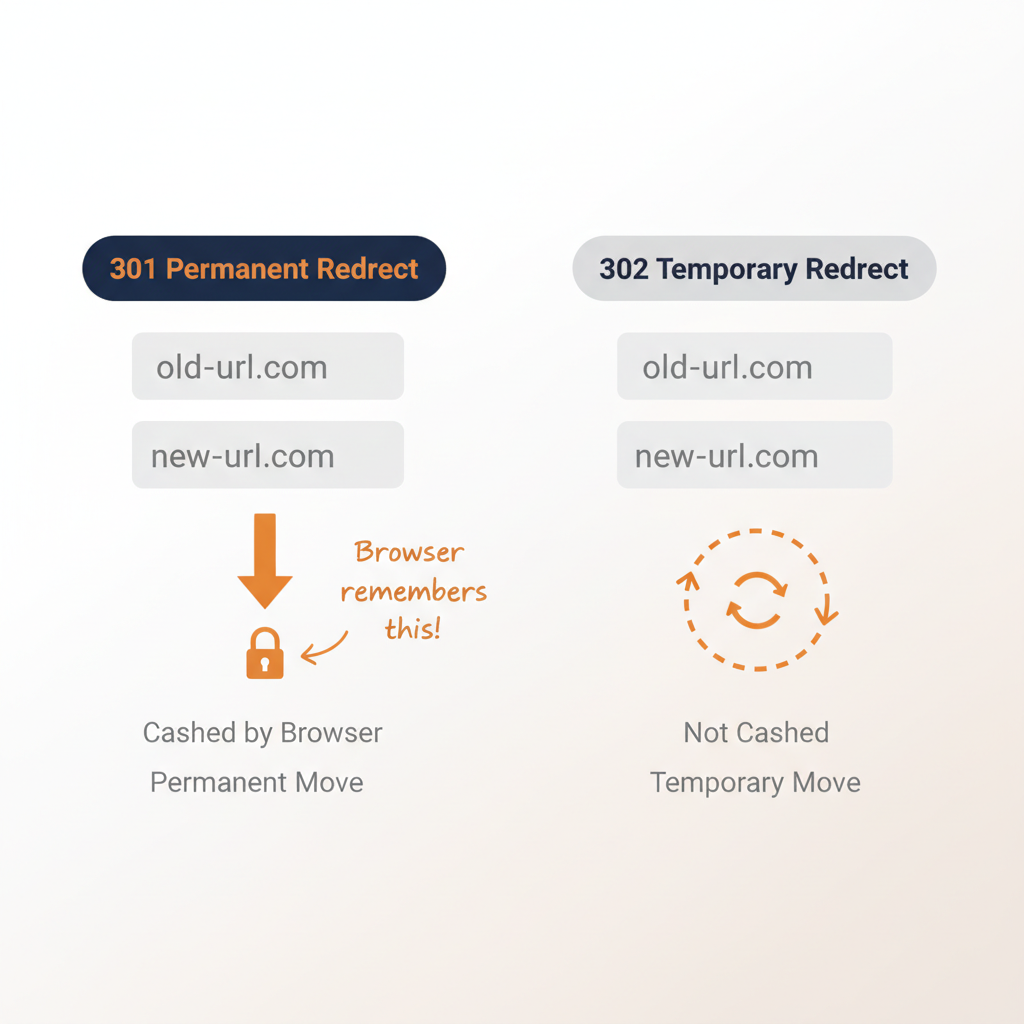
A 301 redirect tells search engines and browsers that a page has permanently moved to a new URL, transferring all link equity and indexing signals to the destination. A 302 redirect signals a temporary move, keeping the original URL in Google’s index while sending users to a different page. Both pass PageRank, but they send different signals about which URL Google should keep indexed.
Here is how they compare across every dimension that matters:
| Feature | 301 Redirect | 302 Redirect |
|---|---|---|
| HTTP Status | “301 Moved Permanently” | “302 Found” (Temporary) |
| Signal to Google | Page has moved permanently | Page has moved temporarily |
| Link Equity | Passes 100% PageRank | Passes PageRank (confirmed by Google) |
| Browser Caching | Cached permanently | Not cached (rechecks every visit) |
| Google Indexes | Destination URL | Original URL |
| Reversibility | Difficult (browser cache persists) | Easy (no caching issues) |
| Best For | Migrations, HTTPS, merges | A/B tests, short links, maintenance |
The key distinction is not about SEO value. Google passes link equity through both redirect types. The real difference is in intent signaling and browser caching behavior, which affect how reversible the redirect is and which URL stays in search results.
What Is a 301 Redirect?
A 301 redirect is an HTTP status code meaning “Moved Permanently.” When a server returns a 301 response, it tells the browser and search engine that the requested URL has permanently relocated to a new address.
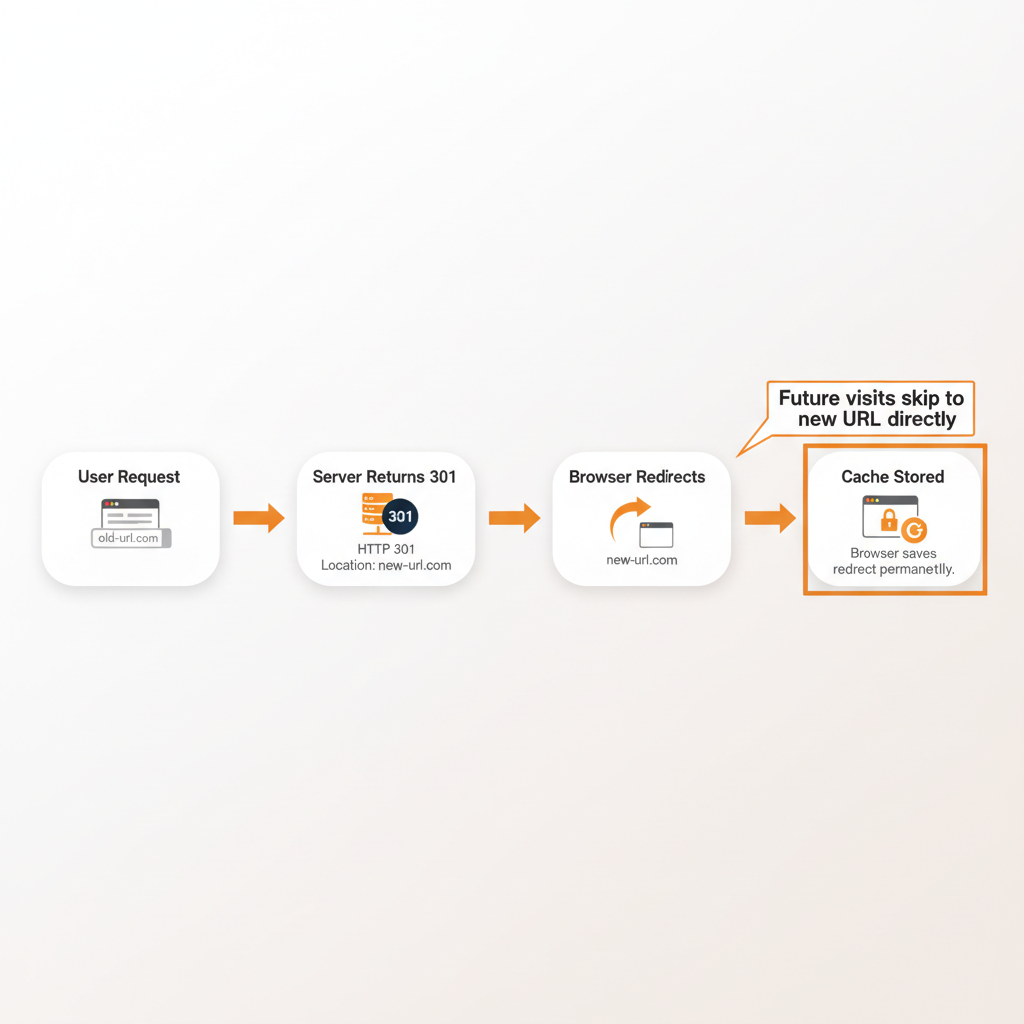
Here is what happens technically when a user hits a 301 redirect:
- Browser requests the original URL
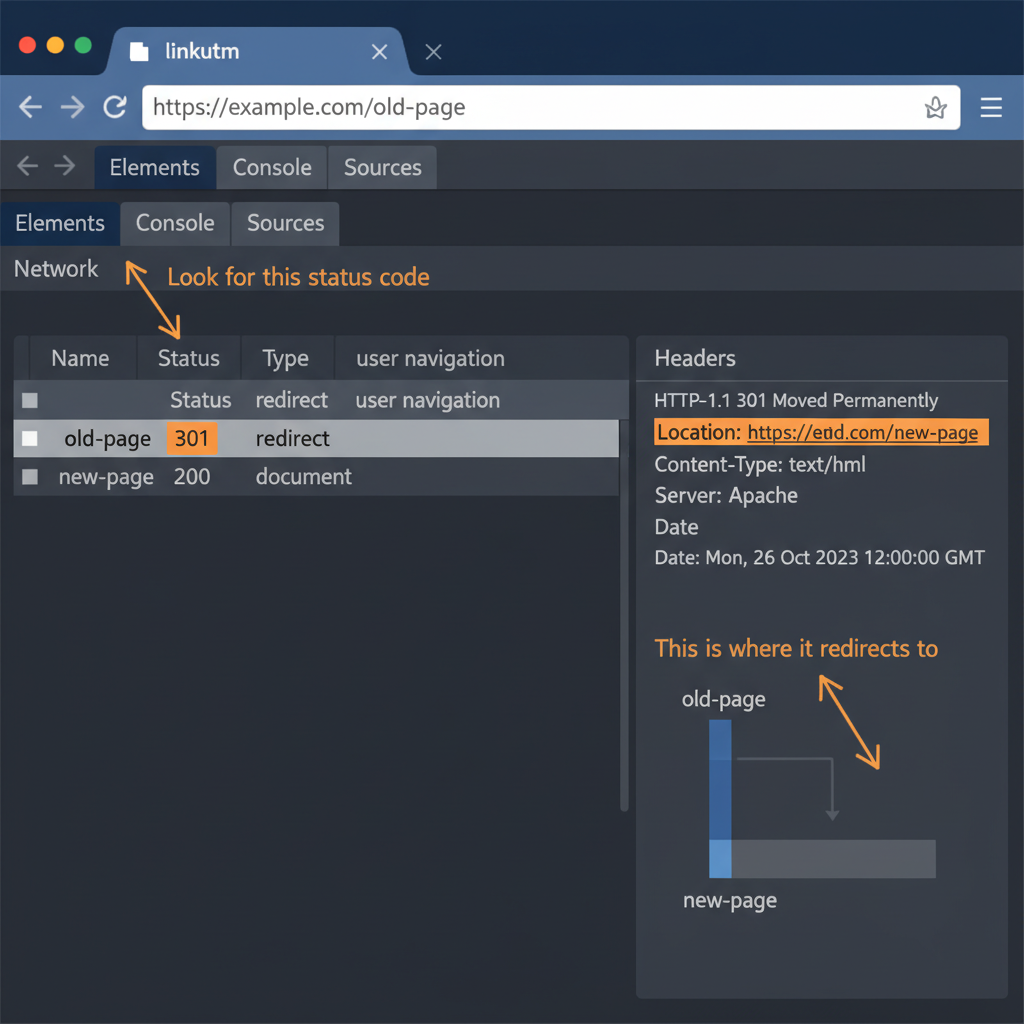
- Server responds with HTTP 301 status and a
Locationheader pointing to the new URL - Browser follows the redirect to the new URL
- Browser caches the redirect permanently, so future visits skip the old URL entirely
That last point matters more than most people realize. Once a browser caches a 301 redirect, the user goes directly to the new URL on every subsequent visit. Even if you later remove the redirect on the server, browsers that already cached it will continue sending users to the destination.
From an SEO perspective, a 301 redirect tells Google to index the destination URL and transfer all ranking signals. Google’s Gary Illyes confirmed in 2016 that “30x redirects don’t lose PageRank anymore” (Search Engine Land, 2016). In practice, SEO practitioners consistently measure 90-99% link equity transfer through 301 redirects (Search Engine Journal, 2023).
What Is a 302 Redirect?
A 302 redirect is an HTTP status code meaning “Found” that temporarily sends users to a different URL while signaling that the original URL will return. The server tells the browser: “This page is temporarily somewhere else, but keep the original bookmarked.”
The technical flow is similar to a 301, with one critical difference:
- Browser requests the original URL
- Server responds with HTTP 302 status and a
Locationheader - Browser follows the redirect to the new URL
- Browser does NOT cache the redirect, so it rechecks the server on every future visit
Because 302 redirects are not cached, you can change the destination URL at any time and users will immediately see the new destination. This flexibility is why 302 redirects are the default choice for URL shorteners, branded links, and any situation where the destination might change.
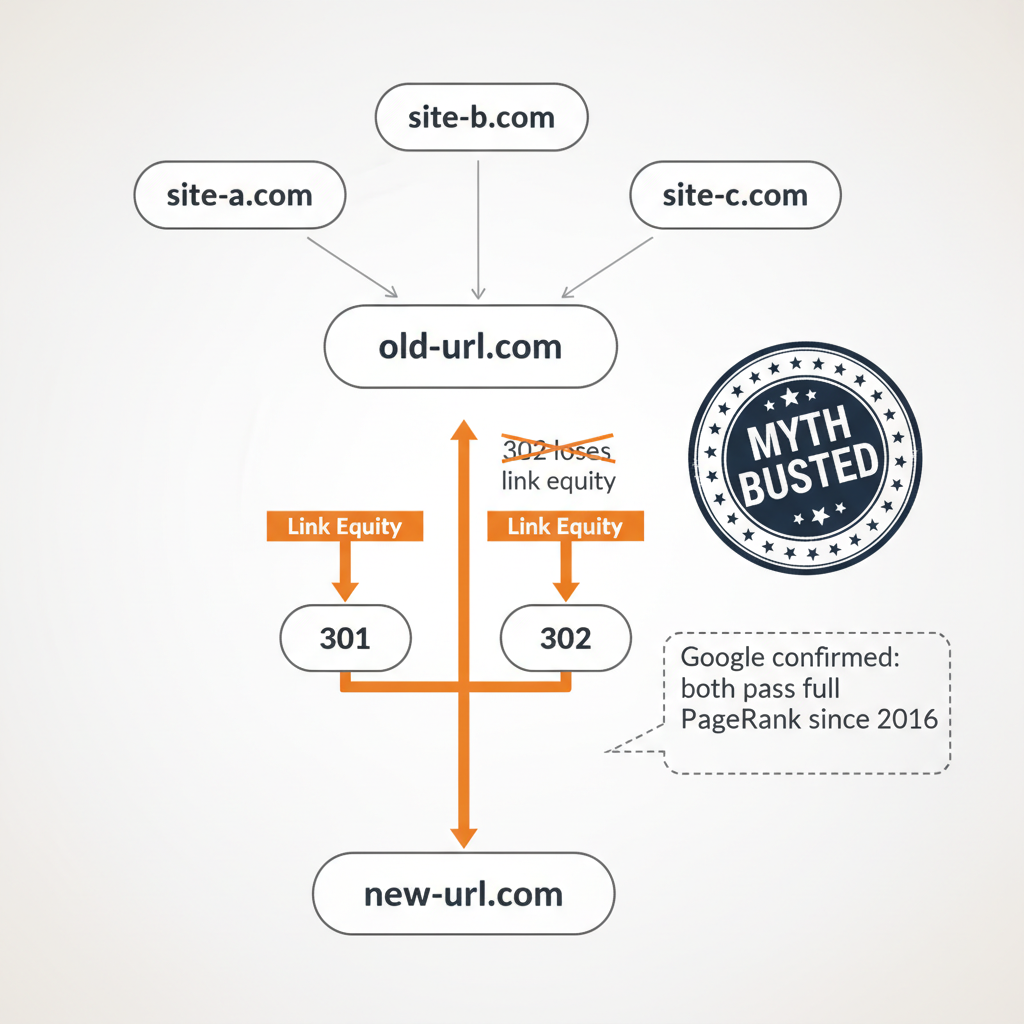
One persistent myth in the SEO community claims that 302 redirects do not pass link equity. This is wrong. Google’s John Mueller directly addressed it: “302 redirects have a ‘bad reputation among SEOs.’ It’s incorrect that 302 redirects wouldn’t pass PageRank. That’s a myth” (iLoveSEO, 2021).
How Do 301 and 302 Redirects Affect SEO?
Do Redirects Pass Link Equity (PageRank)?
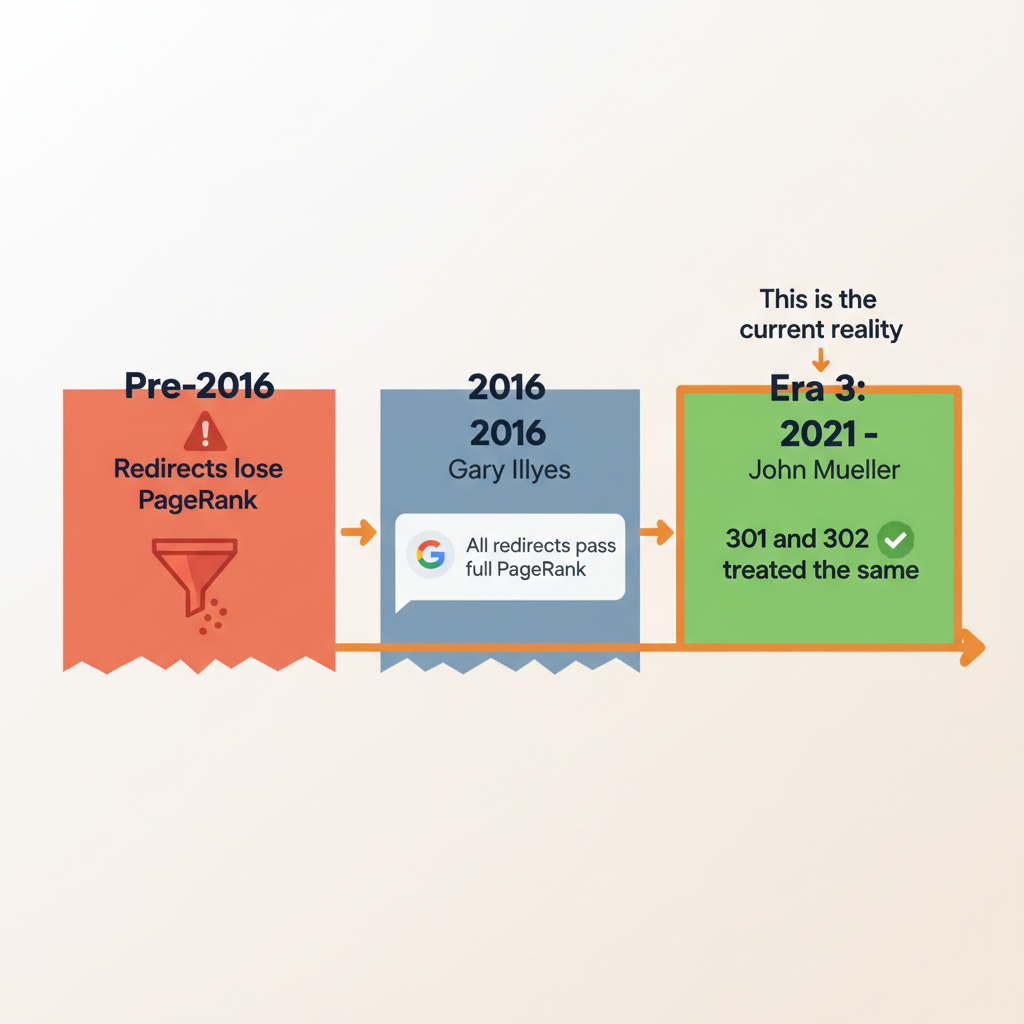
Yes. Both 301 and 302 redirects pass full PageRank. This was not always the case. Before 2016, Google’s algorithm diluted some link equity through redirects. Gary Illyes ended that era when he confirmed that 100% of PageRank transfers through any 30x redirect (Search Engine Land, 2016).
The variance SEO practitioners observe (90-99% transfer) depends on content relevance between the source and destination URLs. Redirecting an old blog post about email marketing to a new blog post about email marketing preserves more equity than redirecting it to a generic homepage.
How Does Google Index Each Redirect Type?
For 301 redirects, Google indexes the destination URL and drops the original from search results. All ranking signals consolidate on the new URL.
For 302 redirects, Google keeps the original URL indexed because it expects the original page to return. However, if a 302 redirect stays in place for months, Google may eventually treat it as a 301 and index the destination instead.
John Mueller confirmed this nuance: “We treat them exactly the same” for long-running redirects, and Google puts both URLs “into the same bucket” for canonicalization (SE Roundtable, 2021).
How Do Redirects Affect Browser Caching?
This is the most overlooked difference between 301 and 302 redirects, and it has real consequences for marketers.
301 redirects are cached permanently by browsers. Once a user visits a 301 redirect, their browser remembers the new destination and bypasses the original URL on every future visit. This makes 301 redirects faster for returning visitors but impossible to reverse at the user level. Even if you remove the 301 from your server, users who already visited it will keep going to the cached destination.
302 redirects are NOT cached. The browser checks the server on every visit, which means you can change the destination at any time and users will immediately see the update. This flexibility comes at a small speed cost since the browser makes an extra server request each time.
For campaign links and branded short links, this caching behavior is the reason most platforms default to 302 redirects.
Do Redirects Affect Page Speed?
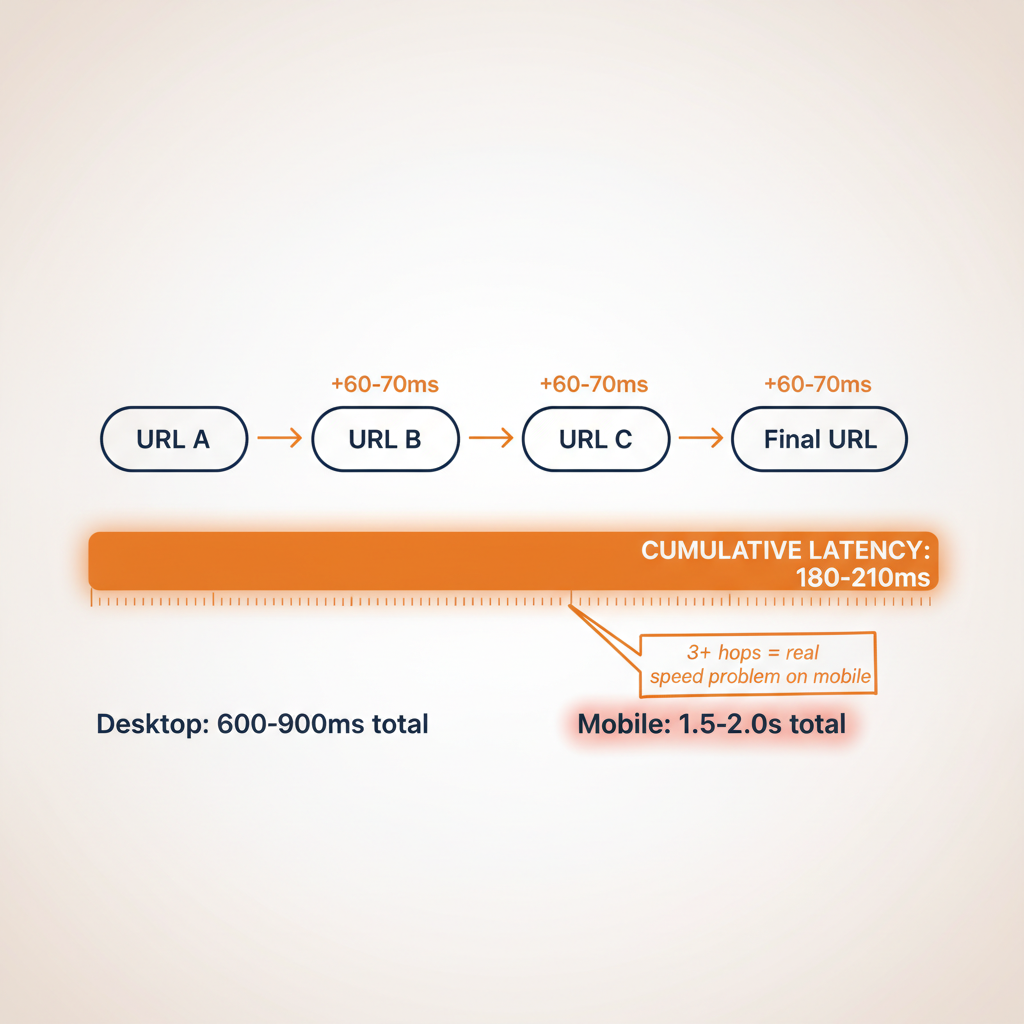
Each redirect hop adds approximately 60-70 milliseconds to page load time (SandboxSEO, 2024). A single redirect is barely noticeable.
The problem starts with redirect chains. When URL A redirects to URL B, which then redirects to URL C, those milliseconds compound. Redirect chains of three or more hops can add 600-900ms on desktop and up to 2 seconds on mobile connections (Catchpoint, 2024).
Approximately 20% of websites have at least one redirect chain causing unnecessary latency (Tutorials Point, 2024). Google’s own crawler follows only 5-10 redirect hops before giving up entirely (Search Engine Land, 2023).
When Should You Use a 301 Redirect?
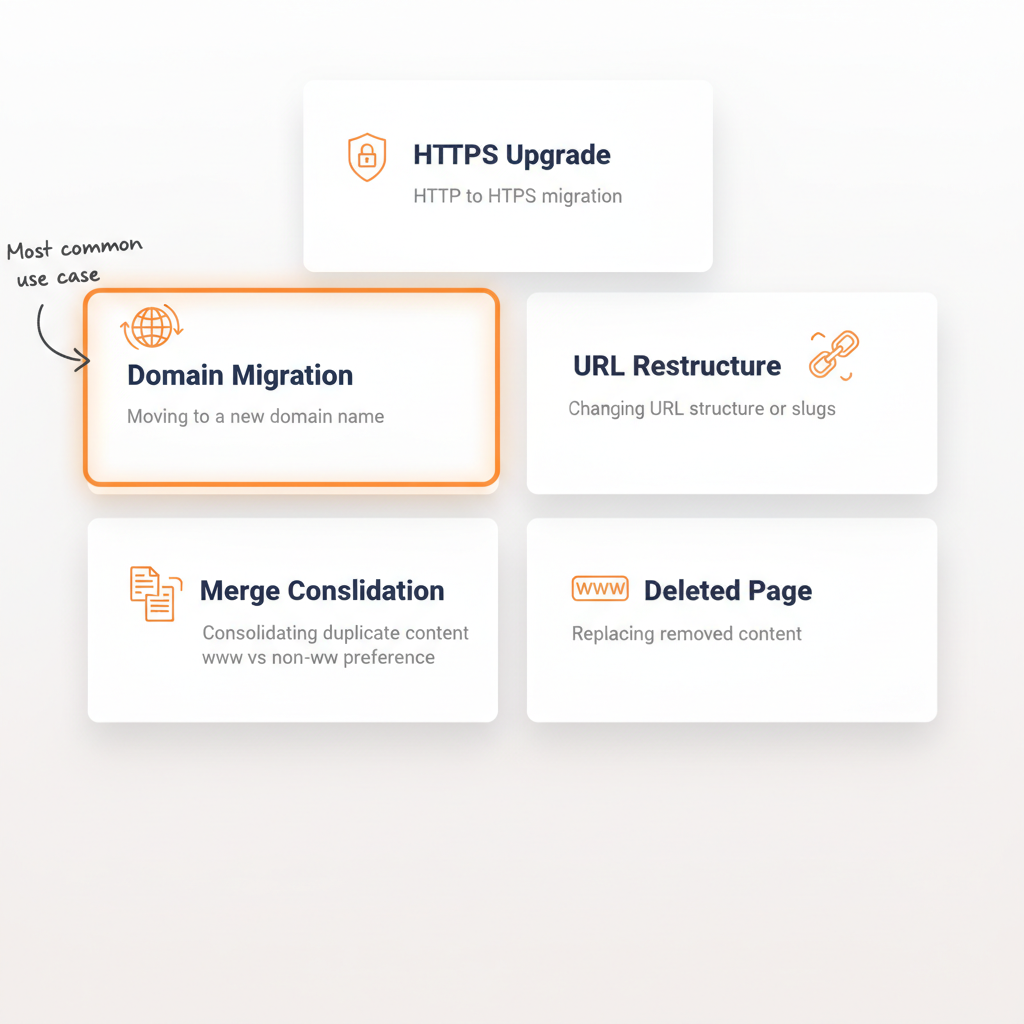
Use a 301 redirect when the URL change is permanent and you never plan to use the original URL again. Here are the six most common scenarios:
1. Domain migration. Moving from old-domain.com to new-domain.com requires 301 redirects on every page. This tells Google to transfer all rankings, backlinks, and authority to the new domain. Only 1 in 10 website migrations improve SEO outcomes (Numen Technology, 2024), making proper redirect implementation critical.
2. HTTP to HTTPS transition. Upgrading to HTTPS is a permanent change. Every HTTP URL needs a 301 redirect to its HTTPS equivalent.
3. Permanent URL structure changes. Redesigning your site with new URL slugs (e. g., changing /blog/post-title to /articles/post-title) requires 301 redirects for every changed URL.
4. Merging duplicate content. If you have /page and /page/ both serving the same content, 301 redirect the duplicate to the canonical version.
5. Consolidating www and non-www. Pick one version (www.site.com or site.com) and 301 redirect the other to prevent duplicate content issues.
6. Permanently replacing deleted pages. When you remove a page but have equivalent content elsewhere, 301 redirect the old URL to the relevant replacement. Without a redirect, 77% of users who hit the resulting 404 error leave permanently (SEO Sandwitch, 2024).
Google recommends keeping 301 redirects active for at least one year (Search Engine Journal, 2024). For URLs with significant backlinks, keep them indefinitely.
When Should You Use a 302 Redirect?
Use a 302 redirect when the URL change is temporary and you plan to bring the original URL back. Here are six scenarios where 302 is the right choice:
1. A/B testing and split testing. When testing different landing page versions, use 302 redirects so Google keeps the original URL indexed. Once testing ends, you remove the redirect and the original page returns without any SEO disruption.
2. Temporary website maintenance. Sending users to a maintenance page while you update your site calls for a 302 redirect. The original page is coming back.
3. Seasonal or promotional pages. Black Friday landing pages, holiday promotions, or limited-time offers that redirect to a temporary page should use 302 redirects. When the promotion ends, the original URL returns.
4. Geolocation-based redirects. Sending users to region-specific content based on their location is a temporary, conditional redirect. The original URL still exists for users in other regions.
5. Branded links and URL shorteners. Most URL shortener platforms use 302 redirects because link destinations may change over time. A campaign link created today might need to point to a different landing page next month. With a 302, you change the destination instantly and every user sees the update immediately.
6. Feature flags and gradual rollouts. Redirecting a percentage of users to a new page version during a phased rollout is a temporary action that calls for 302 redirects.
Which Redirect Type Should URL Shorteners and Branded Links Use?
Most URL shorteners and branded link platforms use 302 redirects by default. This is not an accident. The flexibility of 302 redirects solves several problems that branded link managers face daily.
When you create a branded short link like link.yourbrand.com/summer-sale, you might need to update the destination URL later. Maybe the landing page moved, the campaign ended, or you need to fix a typo in the destination. With a 302 redirect, you change the destination on the server and every user immediately sees the new page.
With a 301 redirect, users who already visited the link have the old destination permanently cached in their browser. Changing the server-side destination does nothing for these users. They keep going to the old page until they manually clear their browser cache.
This caching trap is why 302 is the standard for short links and campaign URLs. The SEO difference is negligible since Google treats long-running redirects the same regardless of type.
How Redirect Type Affects Click Tracking
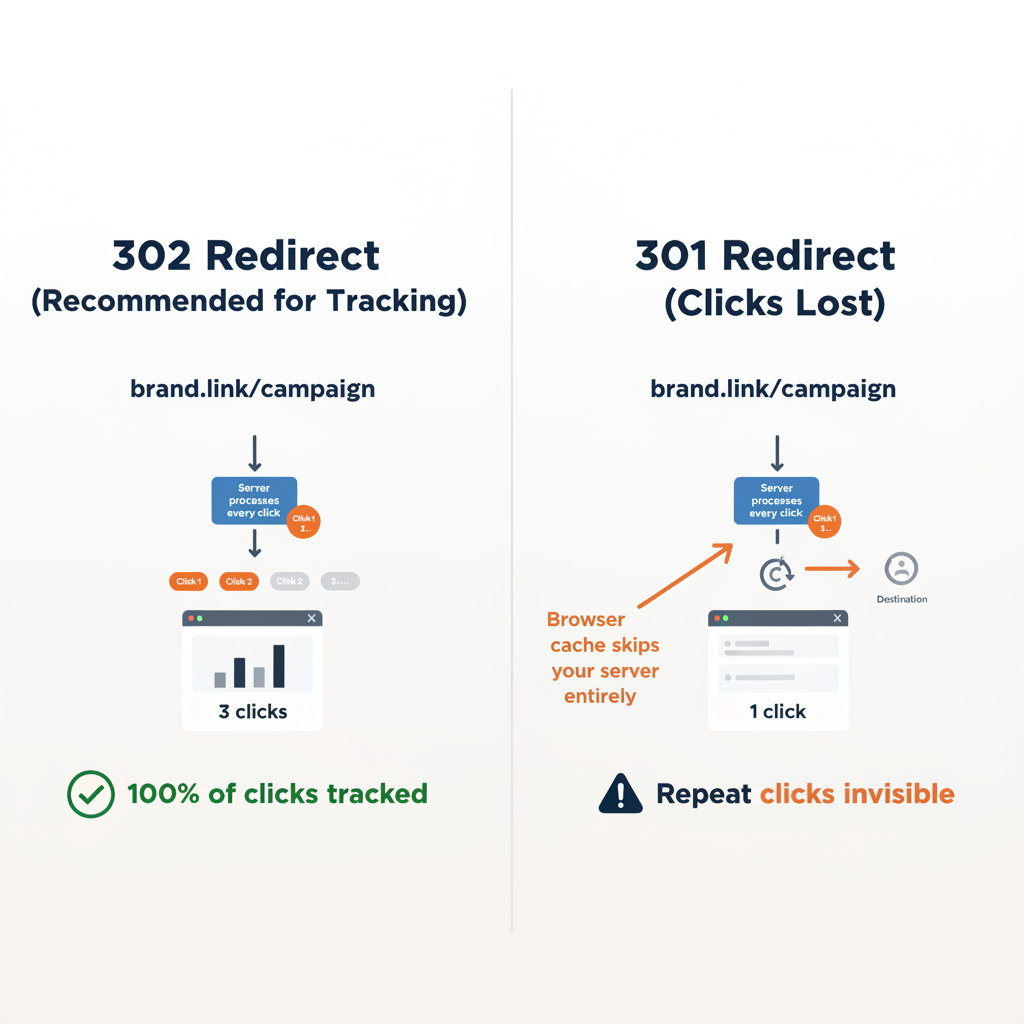
For marketers running campaigns with UTM parameters, redirect type also affects tracking accuracy. Both 301 and 302 redirects preserve UTM parameters in the destination URL. The difference is in how repeat visits are counted.
With a 302 redirect, every click goes through the redirect server, which means every click gets logged. With a 301 redirect, cached browsers bypass the redirect server entirely, so repeat visits from the same user are invisible to your click analytics.
If accurate click tracking matters for your campaigns, and it should, 302 redirects give you better data. Platforms like linkutm use this approach to ensure every click is counted and attributed correctly in your campaign reports.
Branded links increase CTR by up to 39% compared to generic shorteners (Rebrandly, 2023). Making sure those clicks are tracked accurately through proper redirect setup maximizes the value of every branded link you create.
What Google Actually Says About 301 vs 302 Redirects
There is a lot of outdated advice floating around about 301 vs 302 redirects. Here is what Google’s own engineers have said on the record:
Gary Illyes (2016): “30x redirects don’t lose PageRank anymore.” This applied to all 30x redirect types, including 301, 302, 307, and 308. Before this change, redirects caused measurable PageRank loss (Search Engine Land, 2016).
John Mueller (2021): “We treat them exactly the same” when referring to long-running 301 and 302 redirects. Google puts both URLs “into the same bucket” and uses its canonicalization system to decide which URL to show in search results (SE Roundtable, 2021).
John Mueller (2021): Directly addressed the SEO community’s distrust of 302 redirects, stating the “bad reputation among SEOs” is “incorrect” and that 302 redirects do pass PageRank (SE Roundtable, 2021).
So why do SEOs still recommend matching intent? Because correct redirect type selection still matters for two reasons:
- Browser caching. 301 redirects get cached permanently, 302 redirects do not. This affects user experience and your ability to reverse changes.
- Canonicalization signal. While Google treats both the same eventually, using the correct type sends the right signal immediately. A 301 tells Google “index the new URL now.” A 302 says “keep the old URL for now.”
Using the correct redirect type is not about PageRank. It is about sending clear signals and maintaining control over browser behavior.
7 Common Redirect Mistakes That Hurt Your SEO
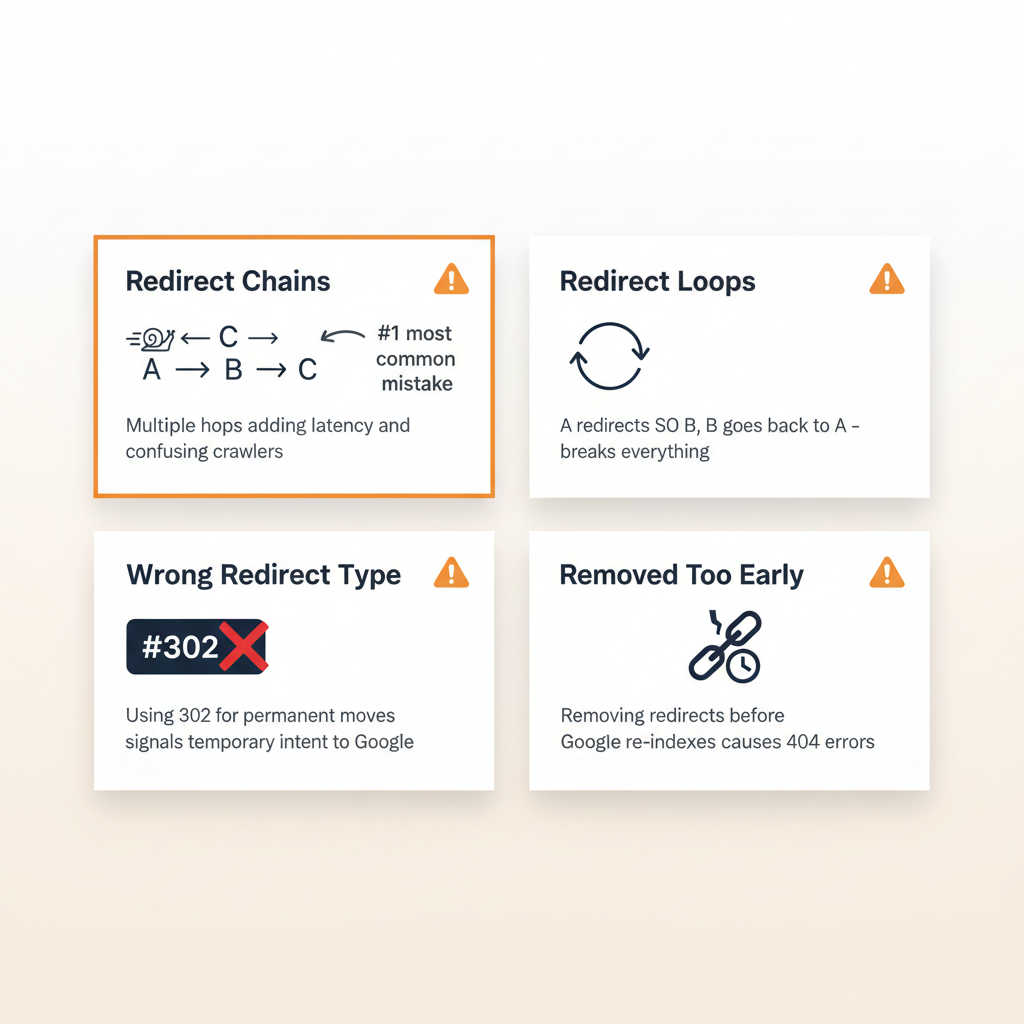
1. Using 302 when you mean 301. If the move is permanent, use a 301. A 302 tells Google to keep the old URL indexed, which delays the canonicalization of your new URL structure.
2. Creating redirect chains. URL A redirects to URL B, which redirects to URL C. Each hop adds 60-70ms. Always redirect directly from the original URL to the final destination.
3. Redirecting to irrelevant content. Redirecting an old blog post about email marketing to your homepage wastes the page-specific link equity. Redirect to the most relevant replacement page.
4. Removing redirects too early. Google recommends keeping 301 redirects for at least one year. 42% of broken links on the web are caused by migrations without proper redirects (SEO Sandwitch, 2024). Removing them early means any external links pointing to the old URL become dead ends.
5. Forgetting to update internal links. After implementing redirects, update your internal links to point directly to the new URLs. Every internal link that still points to the old URL wastes crawl budget on an unnecessary redirect hop.
6. Creating redirect loops. URL A redirects to URL B, which redirects back to URL A. The browser gets stuck in an infinite loop and the page never loads. Audit your redirects regularly to catch loops.
7. Exceeding Googlebot’s hop limit. Googlebot follows a maximum of 5-10 redirect hops before it stops (Search Engine Land, 2023). Beyond that, the URL is flagged as a redirect error in Google Search Console and excluded from indexing.
Website migrations are especially risky. Only 1 in 10 migrations improve SEO outcomes, with the average recovery taking 523 days for those that do recover. 42% of sites never fully recover their traffic (SE Roundtable, 2023). Proper redirect implementation is the single most important factor in migration success.
307 and 308 Redirects: The Modern Alternatives
The HTTP specification includes two newer redirect types that most SEO guides skip: 307 and 308.
| Code | Name | Type | Preserves HTTP Method | Equivalent To |
|---|---|---|---|---|
| 301 | Moved Permanently | Permanent | No (POST may become GET) | – |
| 302 | Found | Temporary | No (POST may become GET) | – |
| 307 | Temporary Redirect | Temporary | Yes (POST stays POST) | Modern 302 |
| 308 | Permanent Redirect | Permanent | Yes (POST stays POST) | Modern 301 |
The main difference is HTTP method preservation. When a browser sends a POST request (like a form submission) and hits a 301 or 302 redirect, the browser may change the request to a GET. With 307 and 308, the original HTTP method is preserved.
When to use 307/308:
- Form submissions that need to be redirected
- API endpoints that handle POST, PUT, or DELETE requests
- Any situation where preserving the HTTP method matters
When to stick with 301/302:
- Standard page redirects (the vast majority of cases)
- Site migrations, URL structure changes, branded links
From an SEO perspective, Google treats all 30x redirects the same for PageRank purposes. All modern browsers support 307 and 308 redirects. For most marketing and SEO use cases, 301 and 302 remain the standard choices.
How to Check Your Redirect Type
You do not need special tools to verify your redirect type. Here are four quick methods:
Browser DevTools. Open Chrome DevTools (F12), go to the Network tab, and reload the page. Look for the status code column. A 301 or 302 status code tells you exactly which redirect type is in use.
Command line. Run curl -I https://your-url.com in your terminal. The response shows the HTTP status code and the Location header with the destination URL.
Google Search Console. Navigate to the Coverage or Pages report. Google flags redirect issues including chains, loops, and unexpected redirect types.
Online redirect checkers. Tools like httpstatus.io or redirect-checker.org trace the full redirect path and show every hop with its status code.
Regular redirect audits catch problems before they affect your rankings. Set a quarterly reminder to check for redirect chains, loops, and unnecessary redirects.
301 vs 302 Redirect FAQ
What is the difference between a 301 and 302 redirect?
A 301 redirect permanently moves a URL and tells Google to index the new destination, while a 302 redirect temporarily sends users to a different URL and keeps the original indexed. Both pass PageRank, but 301 gets cached by browsers and 302 does not.
Does a 302 redirect pass link juice?
Yes. Google’s John Mueller confirmed that 302 redirects pass PageRank and the “bad reputation among SEOs” is incorrect. However, 301 redirects send a stronger canonicalization signal for permanent URL changes.
When should I use a 302 redirect instead of a 301?
Use a 302 redirect when the URL change is temporary: A/B testing, site maintenance, seasonal promotions, geolocation redirects, and URL shorteners where you need flexibility to update the destination later.
How long should I keep a 301 redirect active?
Google recommends at least one year. For URLs with significant backlinks or traffic, keep the redirect indefinitely. Removing it means losing all link equity being passed through.
Does Google treat 301 and 302 redirects the same?
For long-running redirects, yes. Mueller confirmed Google treats them “exactly the same” and puts both URLs “into the same bucket.” However, the correct type still matters for browser caching and canonicalization signaling.
Which redirect type should URL shorteners use?
Most URL shorteners use 302 redirects because they preserve flexibility to change link destinations without browser caching issues. The SEO difference is negligible for short links since Google treats long-running redirects the same.
Do redirects slow down my website?
Each redirect adds approximately 60-70 milliseconds. A single redirect is barely noticeable, but chains of three or more hops add 600-900ms on desktop and up to 2 seconds on mobile.
Can I change a 302 redirect to a 301 later?
Yes. Since 302 redirects are not cached by browsers, the switch takes effect immediately. Going the other direction (301 to 302) is problematic because browsers have already cached the permanent redirect.
Make Every Redirect Count
The 301 vs 302 redirect decision comes down to one question: is this move permanent or temporary?
Use 301 redirects for domain migrations, HTTPS upgrades, URL restructures, and any change where the original URL will never return. Use 302 redirects for A/B tests, maintenance pages, seasonal promotions, and branded links where you need the flexibility to change destinations.
Both redirect types pass full PageRank. Google treats long-running redirects the same regardless of type. The real differences are in browser caching behavior and the canonicalization signal you send to search engines.
For marketers managing campaign links and branded URLs, 302 redirects are almost always the right choice. They preserve click tracking accuracy, allow instant destination updates, and avoid the browser caching trap that makes 301 redirects irreversible for end users.
Start with the right redirect type. Then build on it with proper UTM tracking, branded domains, and campaign analytics that show exactly which links drive results. linkutm handles redirect types, UTM parameters, and click tracking in one platform, so your campaigns are tracked accurately from the first click.